Smart home devices are becoming increasingly common in modern households. From smart lights and thermostats to voice assistants and security cameras, these devices promise convenience, automation, and improved efficiency. However, many users install smart devices individually without understanding how they can work together as a connected system.
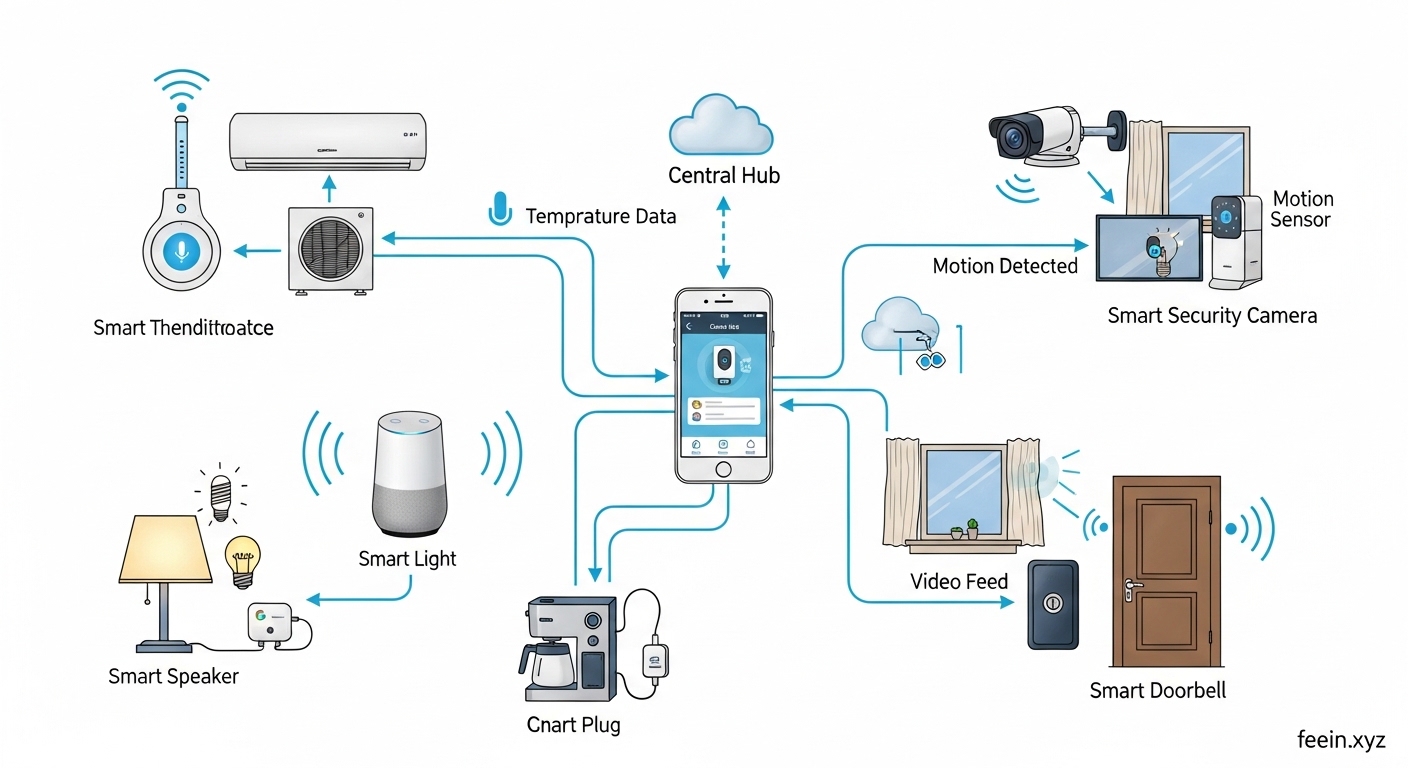
When properly integrated, smart home devices can automate daily routines, improve home security, and reduce manual tasks. This article explores how smart home devices actually work together, including real-world examples, communication technologies, benefits, and important security considerations.
What Are Smart Home Devices?
Smart home devices are internet-connected products designed to monitor, control, or automate functions within a home environment. These devices typically connect through Wi-Fi, Bluetooth, or specialized smart home protocols.
Common categories include:
- Smart lighting systems
- Smart thermostats
- Smart speakers and voice assistants
- Smart security cameras
- Smart door locks
- Smart plugs and switches
- Smart sensors (motion, temperature, door)
Individually, these devices provide useful features. When connected together, they create an automated ecosystem.
How Smart Home Devices Communicate With Each Other
Smart devices do not always communicate directly. Instead, they often use a hub, cloud service, or automation platform.
1. Wi-Fi-Based Communication
Many smart devices connect directly to a home Wi-Fi network. They communicate through cloud platforms or mobile apps.
Advantages:
- Easy setup
- No additional hub required
Limitations:
- Can overload Wi-Fi network
- Dependent on internet connection
2. Hub-Based Systems
Some smart home ecosystems use a central hub that connects multiple devices. The hub acts as a translator between different technologies.
Benefits:
- Improved reliability
- Local automation (works even offline)
- Better device coordination
3. Smart Home Protocols
Devices may use low-power protocols designed for automation:
- Zigbee
- Z-Wave
- Thread
- Matter (emerging standard)
These allow devices to communicate efficiently with minimal energy consumption.
Real Use Case #1: Smart Lighting Automation
Imagine this scenario:
- Motion sensor detects movement in hallway
- Smart lights turn on automatically
- After 5 minutes of inactivity, lights turn off
This simple automation:
Saves energy
Improves convenience
Works without manual control
Devices involved:
- Motion sensor
- Smart light
- Automation app or hub
Real Use Case #2: Smart Security Setup
Smart home security can combine multiple devices:
- Door sensor detects opening
- Camera starts recording
- Smart light turns on
- Phone receives notification
This creates a layered security response rather than relying on a single device.
Benefits:
- Faster awareness
- Deterrence through lighting
- Recorded evidence
- Remote monitoring
Real Use Case #3: Smart Climate Control
Smart thermostats can integrate with sensors and schedules:
Example automation:
- Temperature sensor detects cold room
- Thermostat adjusts heating
- Smart blinds close to retain heat
This coordinated automation improves:
- Energy efficiency
- Comfort
- Reduced manual adjustments
Real Use Case #4: Voice-Controlled Automation
Voice assistants allow users to control multiple devices at once.
Example command:
“Good night”
This could trigger:
- Lights turn off
- Doors lock
- Thermostat adjusts
- Security system arms
This reduces multiple manual steps into one action.
Benefits of Smart Devices Working Together
Improved Convenience
Automation reduces repetitive tasks like turning lights on or adjusting temperature.
Energy Efficiency
Devices coordinate to reduce unnecessary usage, such as turning off unused appliances.
Better Home Security
Multiple sensors and devices create layered protection.
Remote Monitoring
Users can check home status from anywhere.
Customizable Automation
Each home can create routines based on lifestyle preferences.
Common Mistakes When Setting Up Smart Devices
Buying Devices That Do Not Integrate
Some devices only work within limited ecosystems. This can prevent automation between brands.
Overloading Wi-Fi Network
Too many Wi-Fi devices may reduce performance.
Ignoring Security Settings
Default passwords and open access create risks.
Lack of Planning
Installing devices without a strategy reduces automation benefits.
Security Considerations for Smart Home Systems
Security is important because smart devices connect to the internet.
Recommended practices:
- Use strong unique passwords
- Enable two-factor authentication
- Update firmware regularly
- Separate smart devices on guest network
- Disable unused features
These steps reduce unauthorized access risks.
How to Start Building a Smart Home System
Step-by-step approach:
Step 1: Choose a Core Platform
Select a main ecosystem or hub.
Step 2: Start With One Use Case
Example: smart lighting or security.
Step 3: Add Compatible Devices
Ensure integration support.
Step 4: Create Simple Automations
Start small before building complex routines.
Step 5: Monitor Performance
Adjust automation based on usage.
Challenges of Smart Device Integration
While beneficial, smart homes have limitations:
- Compatibility issues between brands
- Internet dependency
- Learning curve for automation setup
- Initial cost of devices
Planning helps reduce these challenges.
The Future of Smart Device Integration
Smart homes are evolving toward:
- Better cross-brand compatibility
- Local processing for faster automation
- AI-powered routines
- Improved energy management
- Simplified setup processes
These developments aim to make smart homes easier to manage and more efficient.
Smart home devices become far more powerful when they work together. By connecting lighting, sensors, security, and climate systems, users can automate daily routines and improve convenience, safety, and efficiency.
Understanding how smart devices communicate and integrate helps avoid common setup mistakes and creates a more reliable smart home environment. With thoughtful planning and proper security practices, smart device ecosystems can provide long-term value and flexibility.
FAQ
Q1: Do smart home devices need internet to work together?
Some automations require internet, while hub-based systems may function locally.
Q2: Can different brands work together?
Yes, if they support common protocols or automation platforms.
Q3: Are smart home devices secure?
They can be secure when proper passwords and updates are used.
Q4: Do I need a smart home hub?
Not always, but hubs can improve reliability and automation.
Q5: Is it expensive to start a smart home?
You can start small with one or two devices and expand gradually.









