Modern workplaces move quickly. Teams often manage multiple projects, communicate across different platforms, and work from different locations or time zones. Without clear systems, even simple tasks can become disorganized.
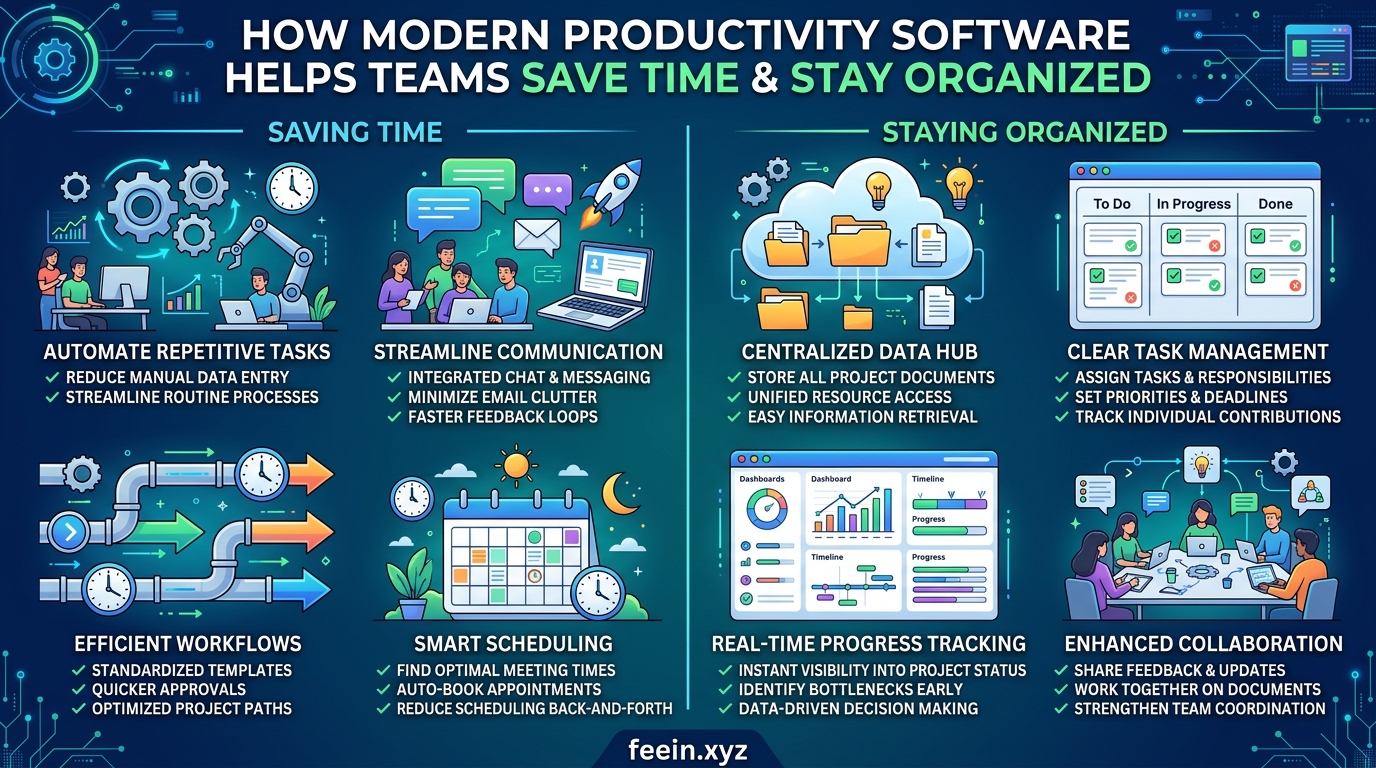
This is why productivity software has become an essential part of daily work for businesses, freelancers, remote teams, and organizations of all sizes.
But productivity tools are not simply about “working faster.” Their real purpose is to help teams stay organized, reduce unnecessary work, improve communication, and make daily operations more manageable.
In this article, we’ll explore how modern productivity software improves workflows, reduces wasted time, and helps teams operate more efficiently using practical examples and real workplace scenarios.
Why Workplace Organization Matters More Than Ever
Many workplace problems are not caused by a lack of skill. Instead, they happen because information becomes difficult to manage.
Common issues include:
- Missed deadlines
- Duplicate work between team members
- Confusing communication
- Lost files and documents
- Unclear responsibilities
- Excessive meetings and emails
As teams grow, these problems often become more serious.
Modern productivity software helps reduce this operational confusion by creating structured systems for communication, task management, and collaboration.
What Is Productivity Software?
Productivity software refers to digital tools designed to help individuals and teams manage work more effectively.
These tools typically support activities such as:
- Task organization
- Team communication
- File sharing
- Scheduling
- Project tracking
- Document collaboration
- Workflow management
Instead of relying on disconnected emails and spreadsheets, teams can centralize work in one organized environment.
How Productivity Software Saves Time
1. Reduces Repetitive Administrative Tasks
One of the biggest causes of lost productivity is repetitive manual work.
Examples include:
- Sending status updates repeatedly
- Searching for files
- Rewriting the same information
- Tracking deadlines manually
Modern productivity platforms automate many of these processes.
For example:
- Automatic reminders notify teams about deadlines
- Shared dashboards display project progress instantly
- Search functions quickly locate documents
This reduces unnecessary administrative effort and allows employees to focus on meaningful work.
Real-World Example: Marketing Team Workflow
A small marketing team managed projects entirely through email.
Over time, they experienced:
- missed tasks,
- duplicate assignments,
- delayed approvals.
After switching to a centralized productivity platform:
- task assignments became visible to everyone,
- deadlines were tracked automatically,
- project updates were easier to monitor.
The result was not “working harder” — it was reducing organizational friction.
How Productivity Software Improves Team Organization
2. Creates Clear Task Ownership
In many workplaces, confusion happens because responsibilities are unclear.
Modern productivity tools help solve this by assigning:
- specific tasks,
- deadlines,
- project ownership,
- progress tracking.
When responsibilities are visible, accountability improves naturally.
Employees spend less time asking:
“Who is handling this task?”
and more time completing actual work.
3. Centralizes Communication
Scattered communication creates confusion.
Without centralized systems:
- important details get buried in email chains,
- files become difficult to locate,
- conversations happen across too many platforms.
Productivity software organizes communication by:
- projects,
- departments,
- task groups,
- workflows.
This creates a more structured work environment.
The Role of Collaboration in Modern Productivity
Modern productivity is no longer based only on individual performance. Most work today depends on collaboration between multiple people.
Good productivity software supports collaboration through:
- shared workspaces,
- real-time document editing,
- team messaging,
- progress visibility,
- shared calendars.
This is especially important for:
- remote teams,
- hybrid workplaces,
- international organizations.
How Productivity Tools Help Remote Teams Stay Organized
Remote work introduces additional challenges:
- different time zones,
- communication delays,
- reduced visibility,
- disconnected workflows.
Without proper systems, remote teams can quickly become disorganized.
Productivity software helps by creating:
- centralized project tracking,
- asynchronous communication,
- shared documentation,
- transparent workflows.
This allows remote employees to stay aligned even when working independently.
Common Productivity Mistakes Teams Make
Even with advanced software, some teams still struggle because of poor implementation.
Mistake 1: Using Too Many Tools
Some companies use:
- one platform for messaging,
- another for files,
- another for tasks,
- another for scheduling.
Too many disconnected systems can increase confusion instead of reducing it.
Mistake 2: Lack of Workflow Structure
Software alone cannot fix disorganized processes.
Teams still need:
- clear responsibilities,
- communication rules,
- organized task systems.
Without structure, productivity tools become cluttered.
Mistake 3: Excessive Notifications
Constant alerts and notifications can reduce focus.
Many teams improve productivity by:
- limiting unnecessary notifications,
- scheduling focused work periods,
- using communication channels more intentionally.
Practical Features That Improve Daily Workflows
Modern productivity platforms often include features such as:
| Feature | Purpose |
|---|---|
| Task Boards | Organize work visually |
| Shared Calendars | Coordinate schedules |
| Cloud Storage | Centralize documents |
| Real-Time Editing | Improve collaboration |
| Workflow Automation | Reduce repetitive work |
| Activity Tracking | Monitor project progress |
These features help teams stay organized while reducing operational delays.
The Psychological Impact of Better Organization
Workplace organization affects more than efficiency.
Disorganized workflows often increase:
- stress,
- frustration,
- mental fatigue.
When employees constantly search for information or clarify responsibilities, cognitive overload increases.
Organized systems help create:
- clearer expectations,
- smoother communication,
- reduced workplace stress.
This improves both productivity and employee experience.
Security and Data Management Considerations
As businesses rely more on digital tools, protecting data becomes increasingly important.
Teams should:
- use strong passwords,
- enable two-factor authentication,
- manage access permissions carefully,
- keep software updated regularly.
Reliable productivity platforms typically include security features, but responsible usage remains essential.
The Future of Productivity Software
Modern productivity tools continue to evolve.
Emerging trends include:
- AI-assisted task organization,
- automated meeting summaries,
- predictive scheduling,
- smarter workflow automation.
The goal is not simply automation — it is reducing unnecessary complexity in modern work environments.
Modern productivity software helps teams save time and stay organized by reducing workflow confusion, improving communication, centralizing information, and supporting collaboration.
However, successful productivity is not only about using digital tools. It also depends on creating clear systems, organized processes, and healthy communication habits.
When implemented thoughtfully, productivity software becomes more than a convenience — it becomes a foundation for efficient and sustainable teamwork in modern workplaces.
Frequently Asked Questions
Q1: Is productivity software useful for small teams?
Yes. Small teams often benefit significantly because organization becomes easier as projects grow.
Q2: Can productivity software replace meetings?
Not entirely, but it can reduce unnecessary meetings by improving visibility and communication.
Q3: Does productivity software improve remote work?
Yes. Centralized workflows and communication systems help remote teams stay aligned and organized.
Q4: What is the biggest mistake when using productivity tools?
Using too many disconnected tools without a clear workflow structure is a common problem.
Q5: Are cloud-based productivity tools secure?
Most reputable platforms include strong security measures, but users should still follow best security practices.









