Every modern computer depends on a processor, commonly called a CPU (Central Processing Unit). Whether you are browsing the internet, editing videos, playing games, or using productivity software, the CPU plays a critical role in how smoothly your device performs.
Despite being one of the most important computer components, processors are often misunderstood. Many people focus only on marketing numbers such as clock speed or core count without understanding how CPUs actually work in real-world situations.
This guide explains modern CPU performance in a practical and beginner-friendly way. Instead of using overly technical definitions, we will explore how processors operate behind the scenes, how they impact everyday tasks, and what factors truly influence performance.
What Is a CPU?
A CPU, or Central Processing Unit, is the main processing component inside a computer. It acts as the system’s decision-making engine by handling instructions from software and coordinating tasks across hardware components.
Every action performed on a device depends on the processor:
- Opening applications
- Loading websites
- Running operating systems
- Editing documents
- Streaming videos
- Managing background tasks
Without a CPU, a computer cannot function.
How CPUs Actually Work
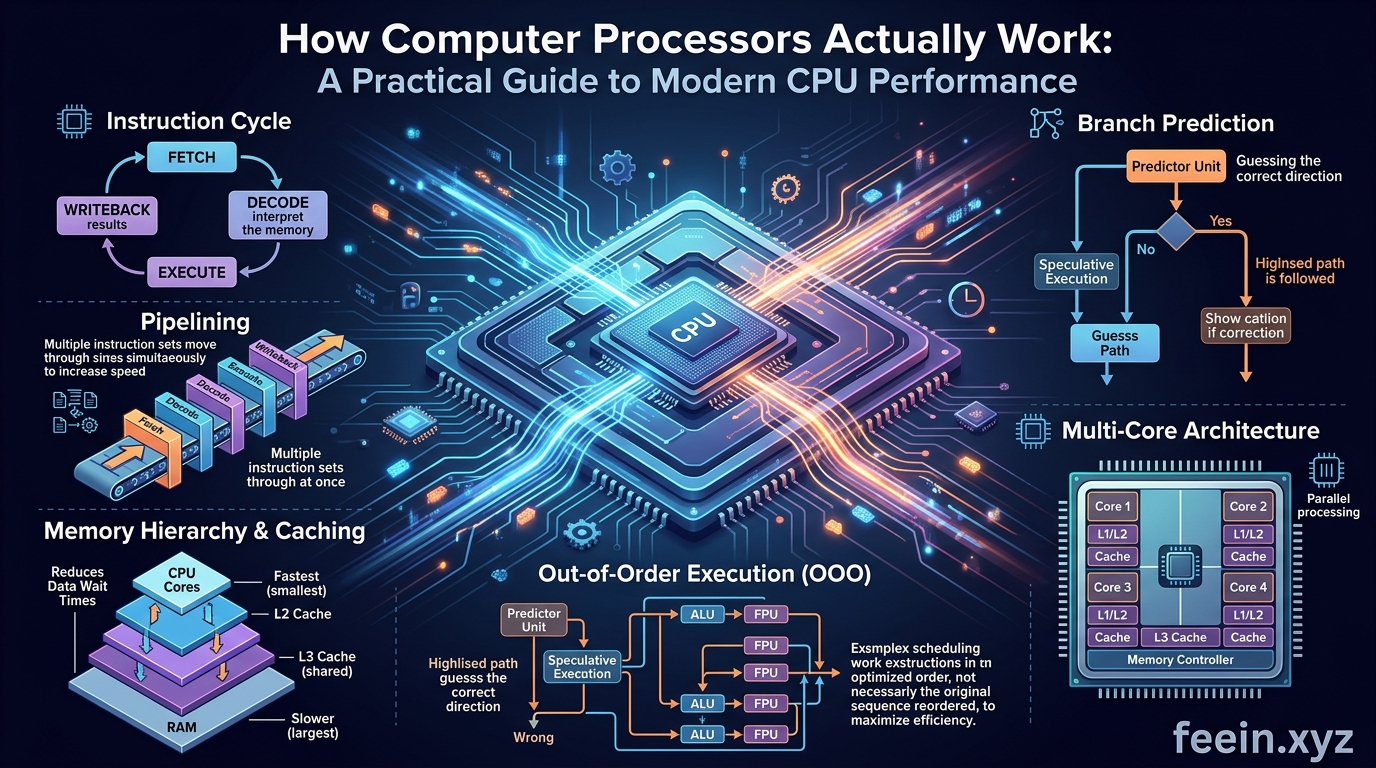
At a basic level, processors follow a continuous cycle:
- Receive instructions
- Process calculations
- Execute operations
- Send results to other hardware components
This process happens billions of times every second.
Modern CPUs contain microscopic electronic circuits called transistors. These transistors switch on and off extremely quickly, allowing the processor to perform calculations and logical decisions.
A modern processor may contain billions of transistors working together simultaneously.
Understanding CPU Cores in Real Life
One of the most important CPU features today is the number of cores.
A core is essentially an independent processing unit inside the processor.
Older processors often had only one core. Modern CPUs may include:
- 4 cores
- 6 cores
- 8 cores
- 12 cores or more
Why Multiple Cores Matter
Imagine a restaurant kitchen with only one chef. Every order must be prepared sequentially.
Now imagine multiple chefs working together at the same time. Tasks are completed faster and more efficiently.
CPU cores work similarly.
Multiple cores allow computers to:
- Run several applications simultaneously
- Improve multitasking
- Handle demanding workloads
- Reduce slowdowns during heavy usage
Real-World Example
While working remotely, a user may:
- Join a video meeting
- Open browser tabs
- Edit spreadsheets
- Stream music in the background
A multi-core processor distributes these tasks efficiently, preventing lag and improving responsiveness.
Clock Speed Explained Simply
Clock speed refers to how quickly a CPU processes instructions.
It is measured in gigahertz (GHz).
For example:
- 3.0 GHz
- 4.2 GHz
- 5.0 GHz
Higher clock speeds generally improve performance, but they are not the only factor that matters.
Why Clock Speed Alone Is Misleading
Two processors with the same GHz may perform very differently because of:
- Architecture improvements
- Cache size
- Core efficiency
- Thermal management
- Power optimization
This is why modern CPUs focus on balanced performance instead of raw speed alone.
What Is CPU Cache?
CPU cache is a small amount of ultra-fast memory built directly into the processor.
It stores frequently used data so the CPU can access it quickly without retrieving information from slower system memory.
Think of cache like a workspace on a desk:
- Frequently used tools remain nearby
- Less-used items stay in storage
Larger and smarter cache systems improve efficiency and reduce delays.
How Modern CPUs Handle Multitasking
Modern operating systems constantly run background tasks:
- Security updates
- Cloud synchronization
- Notifications
- Browser processes
- Antivirus scanning
Without efficient processors, systems would become slow and unstable.
Modern CPUs use advanced scheduling systems to prioritize workloads dynamically.
This allows computers to remain responsive even under demanding conditions.
Real-World CPU Performance Scenarios
Understanding CPU performance becomes easier when connected to practical situations.
Scenario 1: Web Browsing
Modern websites are far more complex than they were years ago.
A single browser tab may load:
- Animations
- Video content
- Scripts
- Advertisements
- Interactive elements
Opening many tabs increases CPU workload significantly.
Efficient processors handle these tasks smoothly without excessive power consumption.
Scenario 2: Video Editing
Video editing software performs complex calculations continuously.
The CPU processes:
- Video rendering
- Effects
- Color adjustments
- Compression
- Exporting files
Processors with more cores and stronger multitasking capabilities perform much better in creative workloads.
Scenario 3: Gaming
Games rely on both the CPU and graphics card (GPU).
The CPU handles:
- physics calculations
- artificial intelligence
- player inputs
- world simulation
A weak processor can create bottlenecks even if the graphics card is powerful.
How Heat Affects CPU Performance
Processors generate heat during operation.
If temperatures become too high:
- performance decreases
- stability problems may occur
- hardware lifespan may shorten
Modern CPUs include thermal management systems that automatically reduce performance temporarily to prevent overheating.
This process is called thermal throttling.
Why Laptop CPUs and Desktop CPUs Differ
Laptop processors prioritize:
- energy efficiency
- battery life
- lower heat generation
Desktop processors prioritize:
- maximum performance
- higher sustained power
- larger cooling systems
This explains why desktops usually outperform laptops in demanding workloads.
Modern CPU Technologies
Today’s processors include advanced technologies designed to improve efficiency and responsiveness.
Hyper-Threading and Simultaneous Multithreading
These technologies allow one physical core to manage multiple task threads simultaneously.
This improves:
- multitasking
- rendering
- professional workloads
AI-Assisted Processing
Some modern CPUs now include AI acceleration features.
These assist with:
- voice recognition
- image processing
- background noise removal
- smart power management
AI-assisted computing is becoming increasingly important in modern devices.
Common CPU Misconceptions
More GHz Always Means Faster
Not necessarily.
Modern processor design matters more than clock speed alone.
More Cores Improve Everything
Some applications benefit heavily from many cores, while others rely more on single-core performance.
Balanced architecture is more important than simply increasing core count.
Older CPUs Become Useless Quickly
Many older processors still perform well for:
- office tasks
- browsing
- streaming
- education
Performance needs depend on usage patterns.
Tips for Maintaining Good CPU Performance
Keep Software Updated
Modern updates improve performance optimization and compatibility.
Avoid Excessive Background Applications
Too many active processes consume CPU resources unnecessarily.
Ensure Proper Cooling
Clean airflow and functioning cooling systems help maintain stable performance.
Use Reliable Security Software
Malware can heavily impact CPU usage and overall system responsiveness.
The Future of CPU Technology
Processor technology continues evolving rapidly.
Future developments may include:
- more energy-efficient architectures
- advanced AI integration
- improved multi-core coordination
- specialized processing units
- enhanced mobile computing performance
As software becomes more demanding, CPUs will continue playing a central role in digital experiences.
Computer processors are far more complex than simple speed numbers or marketing labels. Modern CPUs combine multiple cores, intelligent scheduling systems, fast cache memory, and advanced architectures to handle increasingly demanding workloads efficiently.
Understanding how processors actually work helps users make smarter decisions when buying computers, troubleshooting performance problems, or upgrading systems.
Rather than focusing on a single specification, real-world CPU performance depends on balance, efficiency, cooling, and workload optimization.
As technology evolves, processors will remain the foundation of modern computing across work, education, entertainment, and communication.
Frequently Asked Questions
What does a CPU actually do?
A CPU processes instructions and calculations that allow software and hardware to function together.
Is a faster CPU always better?
Not always. Real-world performance depends on architecture, cooling, software optimization, and workload type.
How many CPU cores do most users need?
For everyday tasks, 4 to 8 cores are usually sufficient. Professional workloads may benefit from higher core counts.
Why does my CPU usage become high?
High CPU usage may result from heavy applications, background processes, malware, or insufficient system resources.
Do CPUs affect gaming performance?
Yes. CPUs handle game logic, physics, and background calculations that directly impact gameplay smoothness.









