Smart homes are no longer just futuristic ideas we see in movies. Today, connected devices have become part of everyday life, helping people automate routine tasks, improve comfort, reduce energy consumption, and enhance home security.
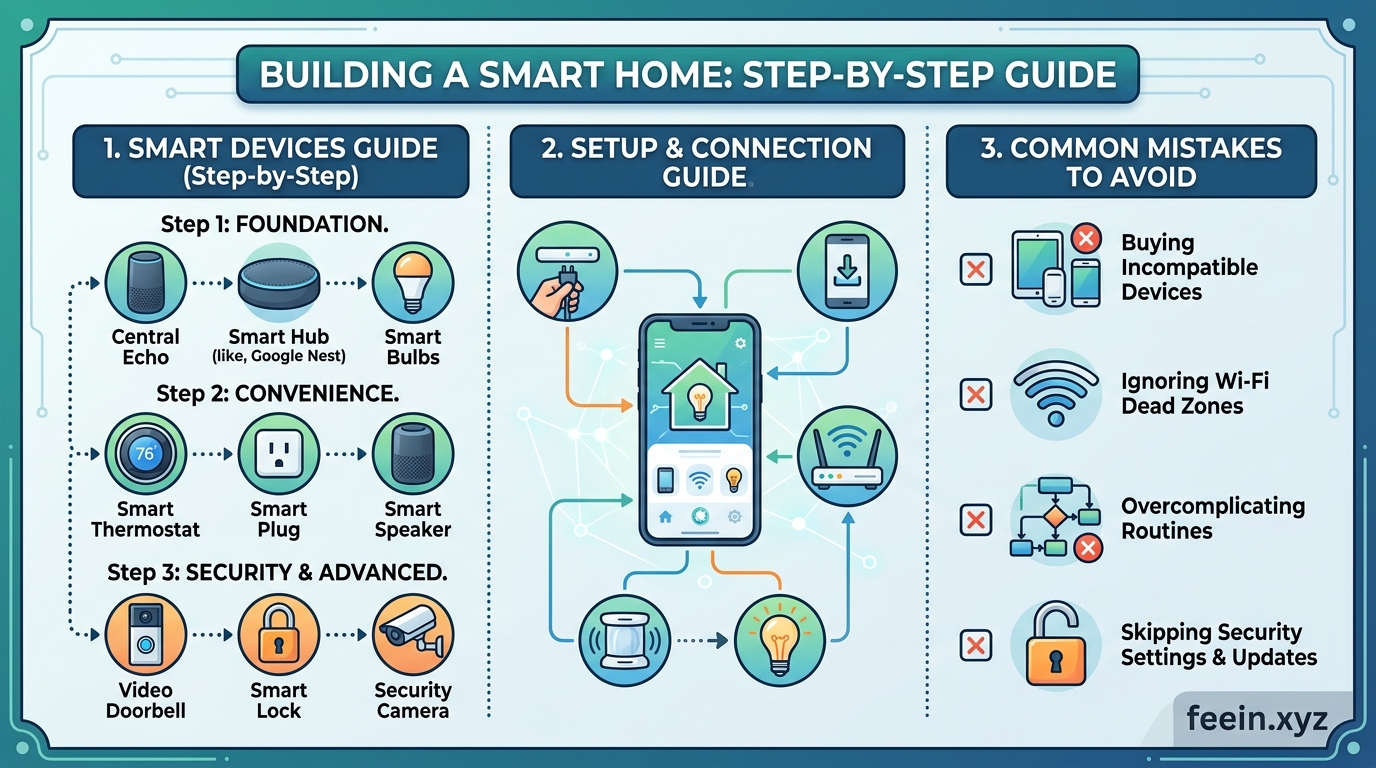
Still, getting started can feel overwhelming for beginners. With smart speakers, sensors, cameras, lighting systems, hubs, and multiple connection standards available, many people end up buying devices randomly without a clear plan — only to discover later that some of them do not work well together.
This guide walks you through the process of building a smart home step by step in a practical and realistic way. Instead of focusing on product hype, the goal here is to help you understand how smart homes actually work and how to avoid the most common beginner mistakes.
What Is a Smart Home?
A smart home is a house equipped with internet-connected devices that can communicate with each other and automate certain actions.
Some of the most common smart home devices include:
- Smart lighting systems
- Smart thermostats
- Smart door locks
- Security cameras
- Motion sensors
- Smart speakers
- Connected home appliances
Most of these devices can be controlled through:
- Mobile apps
- Voice commands
- Automated routines
- Scheduled actions
Step 1: Define Your Main Goal
One of the biggest mistakes beginners make is buying smart devices before deciding what they actually want to achieve.
Ask yourself:
- Do you want better home security?
- Are you trying to reduce energy usage?
- Do you want more convenience in daily life?
- Are you looking to automate repetitive tasks?
A Real-World Example
Imagine a homeowner whose main goal is lowering electricity costs.
Instead of purchasing random gadgets, they start with:
- Smart lights
- Smart plugs
- A smart thermostat
This approach is usually more affordable and far more practical than building a system without a clear purpose.
Step 2: Understand How Smart Devices Connect
Not all smart devices communicate in the same way, and this is where compatibility problems often begin.
Wi-Fi
Advantages:
- Easy to set up
- No additional hub required
- Supported by most devices
Limitations:
- Too many connected devices can overload the network
Bluetooth
Advantages:
- Low power consumption
- Useful for nearby devices
Limitations:
- Short connection range
Zigbee and Thread
Advantages:
- Designed specifically for smart homes
- More energy efficient
- Better device-to-device communication
Limitations:
- May require compatible hubs or ecosystems
Understanding these technologies early can save you from frustrating compatibility issues later on.
Step 3: Start Small
You do not need to transform your entire house overnight.
The smartest approach is to begin with a few devices and expand gradually as your needs grow.
A Good Beginner Setup
- Smart speaker
- Smart lights
- Smart plugs
- Motion sensor
Even this simple setup gives you access to:
- Voice control
- Automation
- Scheduling
- Basic energy management
Step 4: Create Useful Automations
Automation is what truly makes a smart home feel intelligent and convenient.
Morning Routine Example
At 7:00 AM:
- Bedroom lights slowly turn on
- The temperature adjusts automatically
- Weather updates or news begin playing
Evening Routine Example
At sunset:
- Outdoor lights switch on
- Doors lock automatically
- Security cameras activate night mode
These small automations reduce repetitive tasks and make everyday routines smoother.
Step 5: Prioritize Privacy and Security
Smart homes constantly exchange and store data, which makes security an important part of the setup process.
Essential Security Tips
- Use strong passwords
- Enable two-factor authentication
- Keep device software updated
- Change default login credentials immediately
- Separate smart home devices from sensitive work devices when possible
A Common Real-World Mistake
Many users install security cameras but never change the default passwords. That creates unnecessary security risks because default credentials are often publicly known.
Common Mistakes Beginners Should Avoid
1. Buying Too Many Devices at Once
Purchasing a large number of devices immediately can become confusing, expensive, and difficult to manage.
2. Ignoring Compatibility
Not all smart devices work together smoothly. Always research compatibility before buying anything.
3. Overlooking Network Quality
A weak internet connection can seriously affect device performance and reliability.
4. Focusing Only on Features
More features do not always mean a better experience. Practical everyday usefulness matters more.
5. Forgetting Basic Security Settings
Many users overlook simple but critical security measures.
A Simple Smart Home Setup for Beginners
| Area | Device | Main Purpose |
|---|---|---|
| Living Room | Smart lights | Convenience |
| Front Door | Smart lock | Security |
| Bedroom | Smart speaker | Voice control |
| Kitchen | Smart plug | Automation |
| Hallway | Motion sensor | Energy efficiency |
The Future of Smart Homes
Smart home technology continues to evolve rapidly. In the coming years, we will likely see:
- Smarter AI assistants
- Better communication standards between devices
- More advanced automation systems
- Improved energy optimization
The overall trend is moving toward simpler management and less effort for users.
Final Thoughts
Building a smart home does not require a massive budget or complicated equipment. Starting with clear goals, understanding how devices connect, and expanding gradually can help you create a system that is both practical and reliable.
In the end, the best smart home is not necessarily the most expensive one. It is the one that solves real problems and genuinely improves everyday life.
Frequently Asked Questions
Is building a smart home expensive?
Not necessarily. Most beginners can start with a few affordable devices and expand over time.
Do smart homes require technical knowledge?
Most modern smart home devices are designed for easy installation and beginner-friendly setup.
Can smart devices work without internet?
Some features may still function locally, but many smart home capabilities rely on internet connectivity.
Are smart homes secure?
They can be very secure when users follow good practices such as using strong passwords, enabling two-factor authentication, and keeping devices updated.









