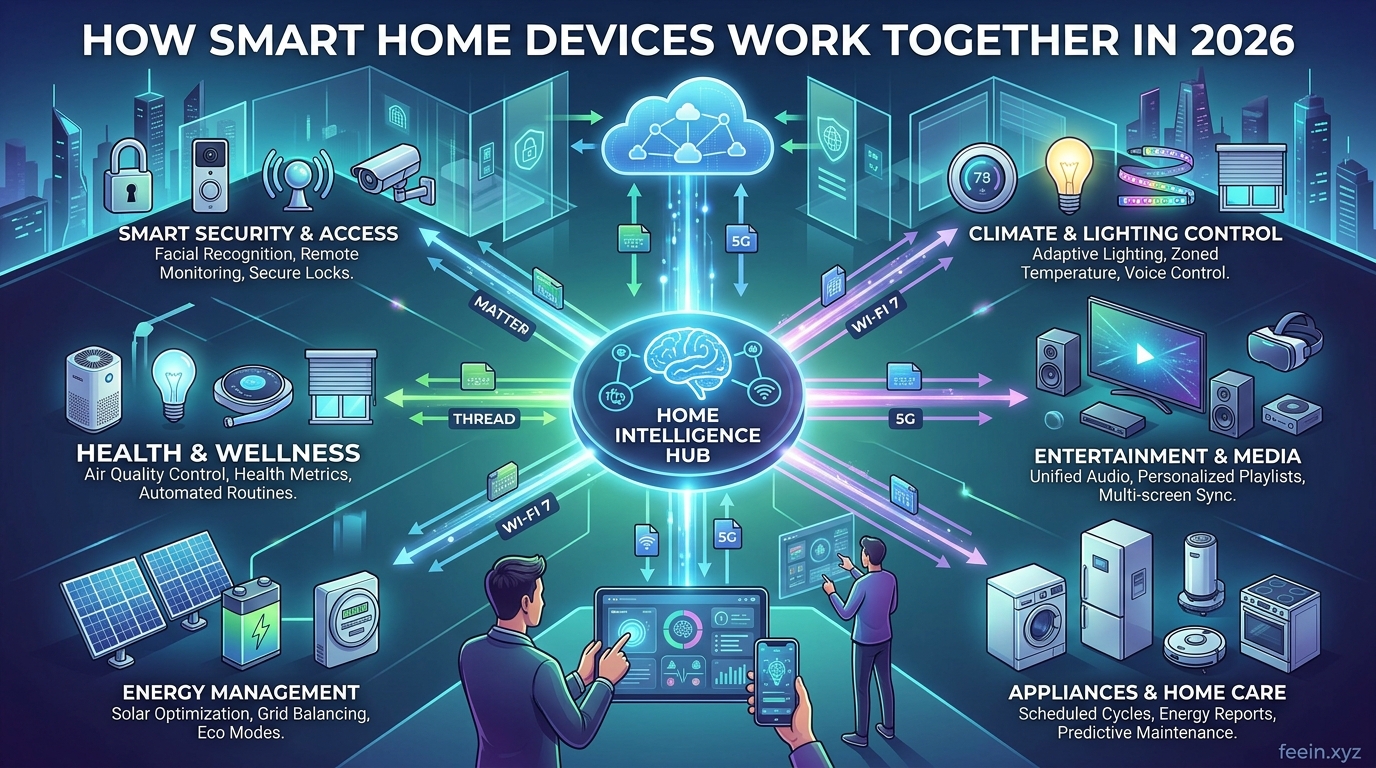
Smart home devices are no longer standalone gadgets. In 2026, they are designed to work together as a connected ecosystem that automates daily routines, improves energy efficiency, and enhances home security.
However, many users buy smart bulbs, cameras, or speakers without understanding how these devices communicate, integrate, and automate tasks. As a result, they miss the real benefits of smart home technology.
This guide explains how smart home devices work together, using real-life scenarios, practical setup tips, and security considerations. Whether you are just starting or improving an existing setup, this article focuses on real value and practical use, not just definitions.
What Does “Working Together” Mean in a Smart Home?
When smart devices work together, they share information and trigger actions automatically. Instead of controlling each device manually, your home responds intelligently based on:
- Motion detection
- Time schedules
- Temperature changes
- Voice commands
- Location-based triggers
This creates automation that reduces manual effort and improves convenience.
Real Example #1: Smart Morning Routine
Here is a practical example of how multiple smart devices can work together:
At 7:00 AM:
- Smart lights gradually turn on
- Smart blinds open automatically
- Smart thermostat adjusts temperature
- Smart speaker reads weather forecast
- Smart coffee plug turns on coffee machine
No manual interaction is required. All devices communicate through automation rules.
This is the core idea of a smart home ecosystem.
Real Example #2: Smart Security Automation
When you leave home:
- Smart door locks activate
- Security cameras turn on
- Motion sensors activate
- Smart lights turn off
- Notifications enabled on your phone
If motion is detected:
- Camera records video
- Phone receives alert
- Smart lights turn on
- Alarm may activate
Multiple devices collaborate to create layered security.
How Smart Devices Communicate
Smart home devices communicate using wireless technologies such as:
Wi-Fi
Most common connection for cameras, speakers, and plugs.
Pros:
- Easy setup
- No hub required
- Works with mobile apps
Cons:
- Can overload network
- Higher battery consumption
Zigbee and Z-Wave
Low-power communication protocols designed for smart homes.
Pros:
- Better battery life
- Reliable mesh networking
- Less Wi-Fi congestion
Cons:
- Often requires hub
Bluetooth Low Energy
Used for short-range smart devices.
Pros:
- Low power usage
- Simple setup
Cons:
- Limited range
Many modern smart homes use a mix of these technologies.
The Role of a Smart Home Hub
A smart home hub acts as a central controller. It connects different devices and allows them to communicate even if they use different protocols.
Without a hub:
Devices work individually.
With a hub:
Devices automate together.
Example automation:
Motion sensor → hub → lights turn on → camera records → notification sent
This is how real automation happens.
Practical Setup Tips for Beginners
1. Start With One Use Case
Instead of buying many devices, begin with one goal:
- Lighting automation
- Security monitoring
- Energy saving
- Voice control
This keeps setup simple.
2. Choose Compatible Devices
Not all smart devices work together. Check:
- platform compatibility
- supported ecosystems
- automation support
Compatibility avoids future limitations.
3. Use Automation Instead of Manual Control
Many users only use apps to turn devices on/off. This removes the benefit of smart homes.
Instead, create:
- schedules
- triggers
- routines
Automation is where smart homes become valuable.
Common Mistakes Users Make
Buying Too Many Devices at Once
This creates confusion and poor integration.
Ignoring Compatibility
Devices from different ecosystems may not communicate.
Weak Wi-Fi Coverage
Poor signal leads to unreliable automation.
Not Using Automation Rules
Manual control defeats the purpose of smart homes.
Security Risks to Consider
Smart home devices connect to the internet, which introduces security considerations.
Potential risks:
- weak passwords
- outdated firmware
- unsecured Wi-Fi network
- unnecessary remote access
These risks can be minimized with proper setup.
Smart Home Security Best Practices
Use Strong Unique Passwords
Avoid default credentials.
Enable Two-Factor Authentication
Adds extra protection.
Keep Devices Updated
Firmware updates fix vulnerabilities.
Separate Smart Devices Network
Advanced users can create guest network for smart devices.
These steps significantly improve security.
Benefits of Smart Devices Working Together
When configured properly, smart devices provide:
- automation of daily routines
- improved home security
- energy efficiency
- remote monitoring
- reduced manual control
- convenience and comfort
The real benefit comes from integration, not individual devices.
Future of Smart Home Integration in 2026
Smart homes continue evolving with:
- AI-based automation
- predictive routines
- better device compatibility
- improved voice assistants
- local processing for privacy
These advancements aim to make smart homes more reliable and easier to use.
Smart home devices become truly useful when they work together. Through automation, communication protocols, and centralized control, these devices transform everyday routines into seamless experiences.
Starting small, focusing on compatibility, and following security best practices can help you build a smart home that is both practical and reliable.
Understanding how smart devices interact allows you to move beyond simple gadgets and create a connected system that improves daily life.
FAQ
Do smart home devices need internet to work together?
Some automations work locally, but many features require internet connectivity.
Can I mix different smart home brands?
Yes, but compatibility depends on supported ecosystems and hubs.
Are smart homes difficult to set up?
Basic setups are simple, especially when starting with one use case.
Do smart home devices increase electricity usage?
Most devices use minimal power, and automation can reduce overall energy consumption.
Is a smart home hub necessary?
Not always, but hubs improve integration and automation capabilities.









