Modern workplaces rely heavily on digital productivity tools. From task management platforms to communication apps and automated workflows, businesses now have access to more software solutions than ever before.
Yet many organizations still experience missed deadlines, communication problems, duplicated work, and employee burnout — even after investing in expensive tools.
This raises an important question:
Why do some teams remain highly productive with simple systems, while others struggle despite using dozens of advanced applications?
The answer often lies in the difference between organized teams and tool-dependent teams.
In this article, we explore the real productivity gap between these two approaches, including practical examples, workflow behaviors, common mistakes, and strategies that help teams work more effectively in modern digital environments.
What Defines an Organized Team?
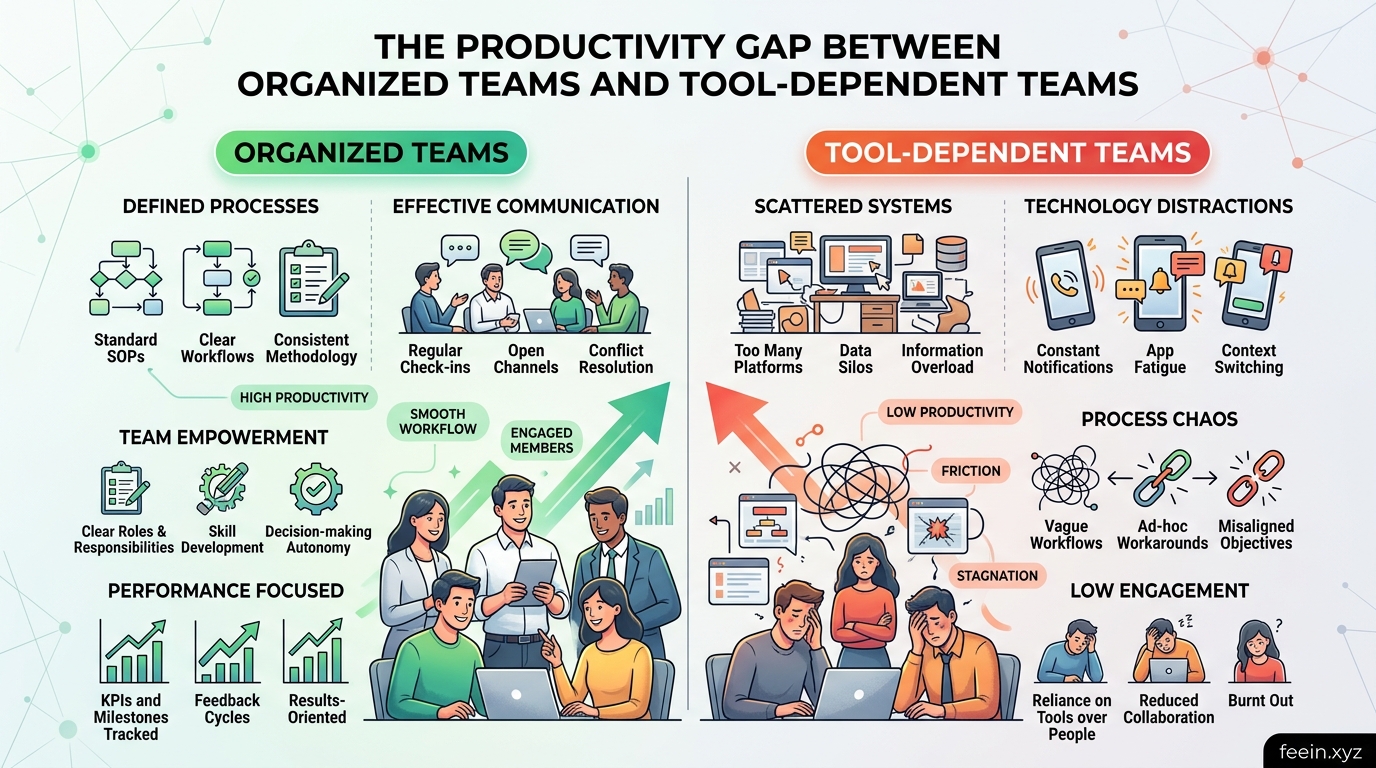
An organized team is not necessarily a team with the most software.
Instead, organized teams usually share these characteristics:
- Clear communication processes
- Defined responsibilities
- Consistent workflows
- Structured documentation
- Realistic priorities
- Controlled use of digital tools
Their productivity comes from clarity and coordination, not from constantly adding new applications.
These teams typically use technology as support — not as a replacement for organization itself.
What Is a Tool-Dependent Team?
Tool-dependent teams rely heavily on software to solve workflow problems that are often organizational in nature.
Instead of improving internal processes, they frequently add more tools in hopes of increasing productivity.
Common signs include:
- Multiple overlapping apps
- Excessive notifications
- Confusing task ownership
- Constant switching between platforms
- Lack of workflow consistency
Ironically, too many tools can create operational confusion rather than efficiency.
The Illusion of Productivity
One of the biggest problems in digital workplaces is the illusion of productivity.
Employees may appear busy because they are:
- replying to messages,
- attending meetings,
- updating dashboards,
- reacting to notifications,
but this does not always translate into meaningful progress.
In some workplaces, employees spend more time managing productivity systems than completing actual work.
This creates what many experts describe as:
“Operational activity without productive output.”
Real-World Example: Organized Team vs Tool-Dependent Team
Consider two marketing teams working remotely.
Team A: Organized Workflow
Team A uses:
- one communication platform,
- one project management system,
- weekly planning sessions,
- clear task ownership.
Their processes are simple and predictable.
As a result:
- projects move faster,
- meetings stay shorter,
- employees experience less stress.
Team B: Tool-Dependent Workflow
Team B uses:
- multiple chat apps,
- several task managers,
- separate note-taking tools,
- overlapping reporting systems.
Employees constantly switch between platforms searching for updates.
Common problems include:
- duplicated tasks,
- missed information,
- notification fatigue,
- delayed decision-making.
Even though Team B uses more software, their workflow becomes slower and more fragmented.
Why Organized Teams Often Perform Better
1. Reduced Cognitive Load
Every additional app requires mental attention.
Employees must remember:
- where information is stored,
- which platform to check,
- how notifications are prioritized.
Organized teams reduce unnecessary mental friction by simplifying systems.
This allows employees to focus on deep work instead of constant digital management.
2. Better Communication Structure
In productive teams, communication is intentional.
Messages are:
- categorized properly,
- documented clearly,
- shared in relevant channels only.
Tool-dependent teams often create communication overload where important information gets buried under constant updates.
3. Stronger Accountability
Organization creates visibility.
When responsibilities are clearly assigned:
- tasks are easier to track,
- deadlines become more realistic,
- performance improves naturally.
Too many overlapping tools can actually reduce accountability because ownership becomes unclear.
The Hidden Cost of Tool Overload
Many companies underestimate the hidden costs of excessive software adoption.
These costs may include:
| Hidden Issue | Impact on Teams |
|---|---|
| Notification fatigue | Reduced concentration |
| Platform switching | Lost productivity time |
| Duplicate systems | Workflow confusion |
| Constant updates | Training frustration |
| Overcomplicated processes | Slower execution |
Research in workplace productivity consistently shows that excessive interruptions reduce focus and increase mental exhaustion.
How Productivity Tools Become Distractions
Productivity tools are designed to improve efficiency, but poor implementation can create the opposite effect.
Some common problems include:
Endless Notifications
Continuous alerts interrupt concentration and reduce deep work capacity.
Too Many Meetings
Communication platforms sometimes increase unnecessary meetings rather than reducing them.
Over-Tracking Employees
Excessive monitoring systems can reduce trust and create workplace stress.
Constant Tool Switching
Switching between applications repeatedly consumes mental energy and reduces workflow continuity.
Signs Your Team Is Becoming Tool-Dependent
A team may be overly dependent on productivity software if:
- employees constantly ask where information is stored,
- tasks exist in multiple systems,
- meetings focus more on tools than outcomes,
- notifications become difficult to manage,
- software adoption grows faster than productivity itself.
These are often signs of structural workflow problems rather than technology limitations.
Building an Organized Digital Workflow
Technology works best when combined with clear operational structure.
Here are practical ways teams can improve organization without relying on excessive software.
1. Use Fewer Core Platforms
Instead of adding tools constantly, focus on:
- one communication system,
- one task manager,
- one documentation platform.
Simpler ecosystems reduce confusion.
2. Create Clear Communication Rules
Define:
- where urgent discussions happen,
- where project updates belong,
- when meetings are necessary,
- how tasks are assigned.
Structured communication reduces chaos significantly.
3. Prioritize Workflow Simplicity
The most productive systems are often the simplest.
Complexity may look advanced, but it frequently slows execution.
4. Audit Existing Tools Regularly
Many companies continue paying for software employees barely use.
Review tools periodically and remove unnecessary platforms.
The Human Side of Productivity
One important reality is often ignored:
Productivity is ultimately driven by people, not software.
Tools can support workflows, but they cannot replace:
- leadership,
- organization,
- communication skills,
- decision-making,
- accountability.
Companies that focus only on software often overlook the human systems that actually create efficient teamwork.
Future Trends in Workplace Productivity
Modern organizations are beginning to shift away from “tool accumulation” toward smarter workflow design.
Emerging trends include:
- integrated digital workspaces,
- AI-assisted workflow organization,
- simplified communication systems,
- reduced notification environments,
- asynchronous collaboration models.
The future of productivity may involve using fewer tools more effectively — not endlessly adding new ones.
The productivity gap between organized teams and tool-dependent teams is not primarily about technology itself.
It is about:
- workflow clarity,
- communication quality,
- operational simplicity,
- structured collaboration.
While productivity tools can improve efficiency, excessive dependence on software often creates distraction, fragmentation, and mental overload.
Highly productive teams usually succeed because they combine technology with strong organizational habits — not because they use the largest number of apps.
Understanding this balance helps businesses build healthier, more efficient digital work environments in the modern workplace.
Frequently Asked Questions
Can productivity tools reduce efficiency?
Yes. Poorly managed tools, excessive notifications, and fragmented workflows can reduce focus and slow productivity.
Why do some teams perform better with fewer tools?
Simpler systems reduce confusion, improve communication clarity, and minimize workflow interruptions.
What is notification fatigue?
Notification fatigue happens when constant alerts overwhelm employees and reduce concentration.
How can companies avoid tool overload?
Organizations should regularly review software usage, simplify workflows, and focus on clear communication processes instead of constantly adding new platforms.
Are productivity tools still useful?
Absolutely. Productivity tools are valuable when they support structured workflows rather than replace organizational discipline.









