Smart home devices are becoming more common in modern households. From smart speakers and lighting systems to connected thermostats and security cameras, these technologies promise convenience, automation, and improved efficiency. However, many users install smart devices without fully understanding how they work together, how they communicate, or what limitations they may have.
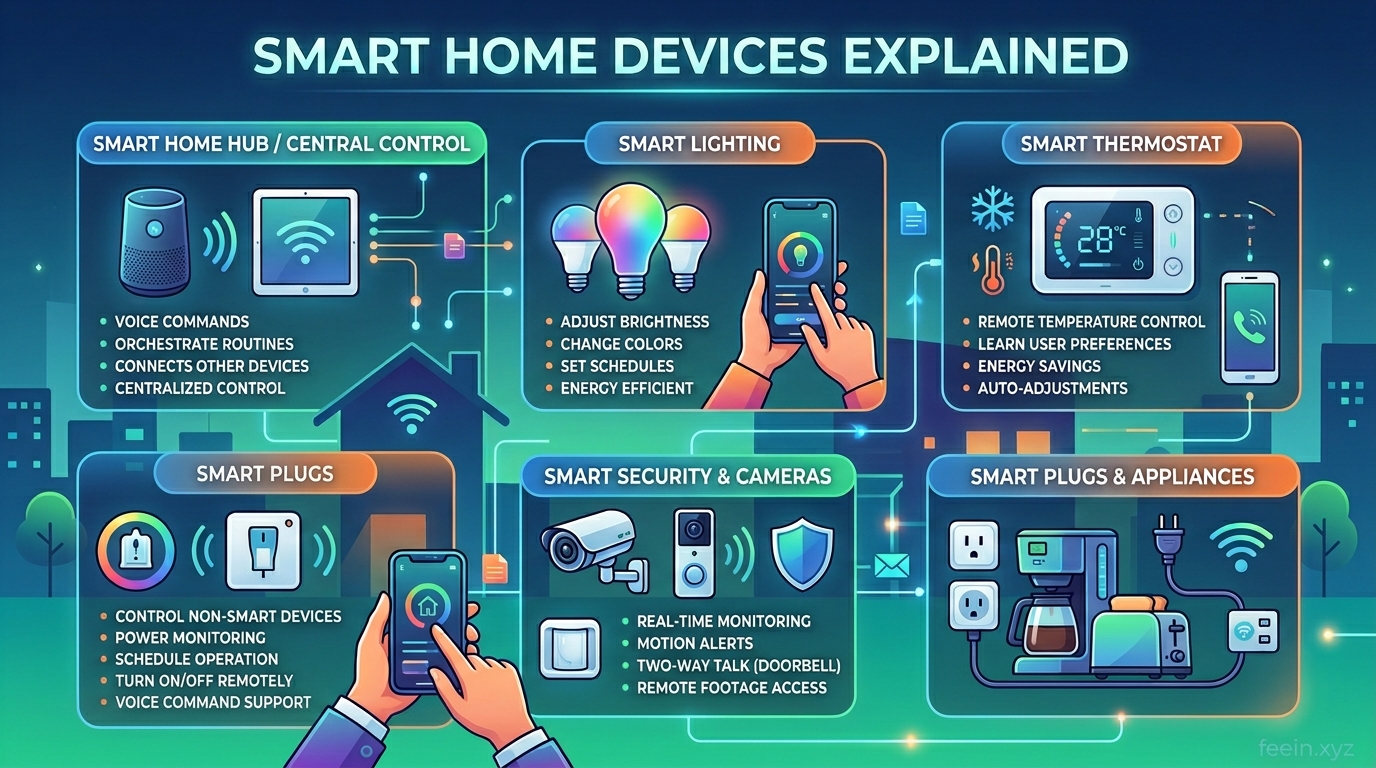
Instead of focusing only on definitions, we explore how these devices function in everyday situations, how they connect behind the scenes, and what most users overlook when building a smart home.
What Are Smart Home Devices?
Smart home devices are internet-connected products that allow users to control household functions remotely or automatically. These devices can communicate with each other and respond to commands, schedules, or environmental conditions.
Common examples include:
- Smart lights
- Smart speakers
- Smart plugs
- Smart thermostats
- Smart doorbells
- Smart cameras
- Smart locks
These devices are typically controlled using mobile apps, voice assistants, or automation rules.
How Smart Home Devices Connect
Many users assume smart devices simply connect to Wi-Fi and work immediately. In reality, there are several connection methods that affect performance and reliability.
Wi-Fi Connections
Wi-Fi is the most common connection type. Devices connect directly to the home router.
Advantages:
- Easy setup
- No additional hub required
- Works with most mobile apps
Limitations:
- Can overload network with many devices
- Higher battery consumption
- May lose connection if Wi-Fi is unstable
Hub-Based Connections
Some smart devices use a central hub. The hub communicates with devices and connects them to the internet.
Advantages:
- Better stability
- Lower battery usage
- Handles multiple devices efficiently
Limitations:
- Requires additional hardware
- Slightly more complex setup
Bluetooth and Local Connections
Some devices use Bluetooth for short-range communication. These are usually used for simple automation.
Advantages:
- Low power consumption
- Fast local response
Limitations:
- Limited range
- Not ideal for full-home coverage
Real-Life Example: How Smart Devices Work Together
To understand how smart devices function in practice, consider a simple morning routine:
- Smart alarm triggers at 7:00 AM
- Smart lights gradually turn on
- Smart thermostat adjusts temperature
- Smart blinds open automatically
- Smart speaker reads weather update
This automation improves comfort without manual interaction.
This type of integration is what makes smart homes useful beyond basic remote control.
Real Benefits of Smart Home Devices
Convenience
Users can control devices from anywhere. For example, turning off lights remotely or adjusting temperature before arriving home.
Energy Efficiency
Smart thermostats and lighting systems reduce energy usage by automatically adjusting based on schedules or occupancy.
Security
Smart cameras, doorbells, and locks improve awareness and control over home access.
Automation
Devices can perform tasks automatically, reducing daily manual actions.
What Most Users Overlook
Many users focus only on features and ignore practical considerations.
Network Stability Matters
A weak Wi-Fi signal can cause devices to disconnect frequently. This leads to delays and unreliable automation.
Too Many Apps Create Confusion
Using multiple device brands may require separate apps. This reduces usability and complicates automation.
Battery Maintenance
Some smart devices require battery replacement. Users often overlook maintenance schedules.
Compatibility Issues
Not all smart devices work together. Checking compatibility before buying is important.
Security Considerations
Because smart devices connect to the internet, security should not be ignored.
Important practices include:
- Use strong Wi-Fi passwords
- Enable two-factor authentication
- Update firmware regularly
- Disable unused features
- Use separate guest networks when possible
These steps reduce risks associated with connected devices.
Common Mistakes When Setting Up Smart Devices
Buying Too Many Devices at Once
Starting small allows users to learn gradually and avoid unnecessary complexity.
Ignoring Automation
Many users only control devices manually and miss automation benefits.
Placing Devices Poorly
Smart cameras, sensors, and speakers perform best when positioned correctly.
Not Testing Routines
Automation rules should be tested to ensure they behave as expected.
How to Start Building a Smart Home
A practical approach is to start with three core devices:
- Smart speaker or voice assistant
- Smart lighting system
- Smart plug
These devices provide basic automation and help users understand how smart systems interact.
After that, users can expand gradually based on needs.
The Future of Smart Devices
Smart home technology continues to evolve. New developments include:
- Better device compatibility
- Improved local processing
- Faster automation response
- Enhanced privacy controls
- AI-powered routines
These advancements aim to make smart homes more reliable and easier to manage.
Smart home devices offer convenience, automation, and improved control over daily household activities. However, understanding how they connect, how they work together, and what limitations exist is essential for creating a reliable setup.
By focusing on compatibility, network stability, and security, users can build smart home systems that genuinely improve daily life rather than complicate it.
FAQ
Q1: Do smart home devices always require Wi-Fi?
Most devices use Wi-Fi, but some rely on hubs or Bluetooth connections.
Q2: Can different smart device brands work together?
Some can, but compatibility varies. Checking integration support is recommended.
Q3: Are smart home devices difficult to set up?
Most devices are designed for simple setup using mobile apps.
Q4: Do smart devices consume a lot of electricity?
Most devices use minimal power, especially when idle.
Q5: Is a smart home expensive to build?
Users can start small and expand gradually based on budget and needs.









