Most people use web browsers every day without thinking much about the security systems working behind the scenes. Whether checking email, shopping online, reading articles, or using cloud applications, browsers constantly process data from thousands of websites.
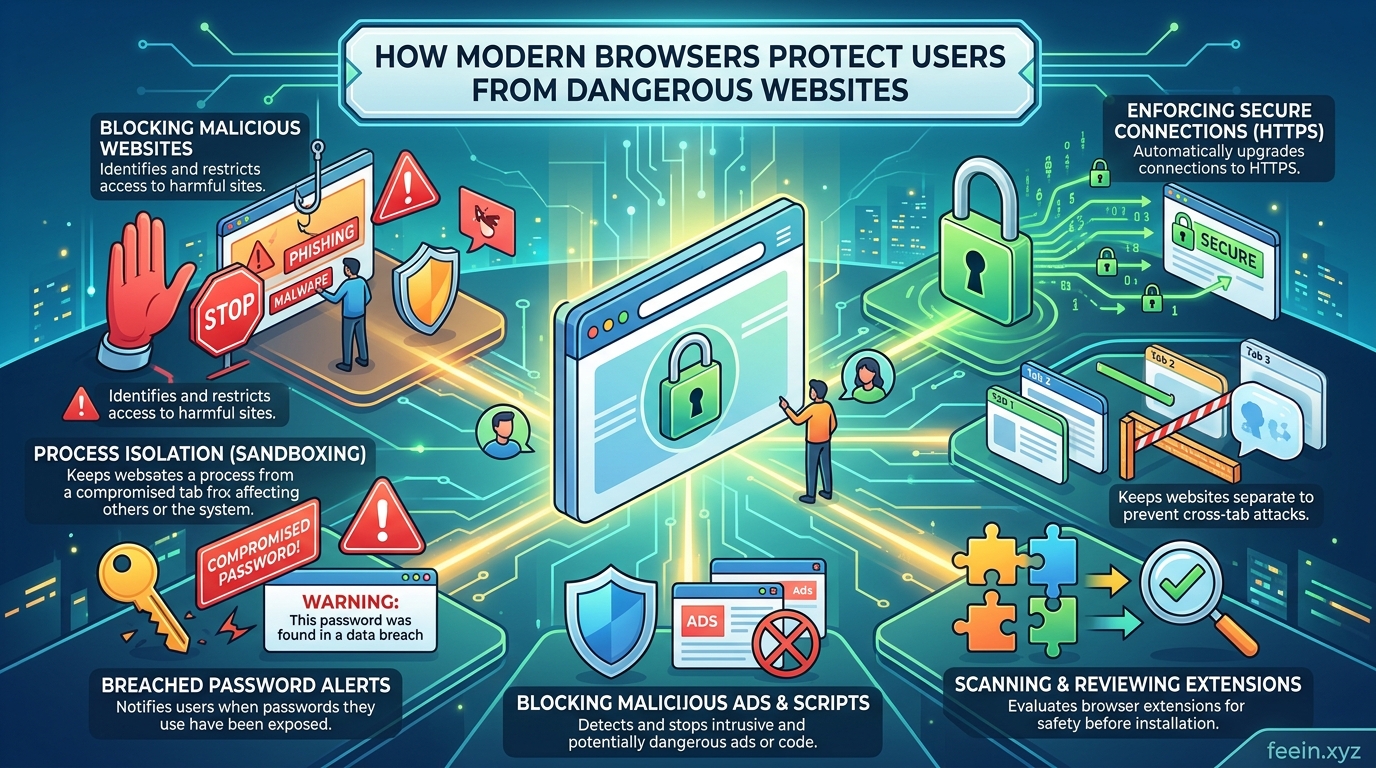
At the same time, cyber threats have become more advanced. Dangerous websites can attempt to steal passwords, distribute malware, track personal information, or trick users into revealing sensitive data.
Modern browsers are designed to reduce these risks through multiple layers of protection. Many users are surprised to learn how much security work happens automatically while browsing the internet.
This guide explains how modern browsers protect users from dangerous websites, the technologies involved, common online threats, and practical habits that improve browsing safety.
Why Dangerous Websites Still Exist
Despite improvements in internet security, malicious websites remain common because attackers continuously create new methods to target users.
Some dangerous websites are designed to:
- Steal login credentials
- Install harmful software
- Display fake warnings
- Collect personal information
- Redirect users to fraudulent pages
- Exploit outdated browser vulnerabilities
In many real-world cases, users do not realize a website is dangerous until after information has already been compromised.
How Modern Browsers Detect Dangerous Websites
Modern browsers use several technologies together rather than relying on a single protection system.
These protections operate in real time while users browse the internet.
1. Safe Browsing Databases
One of the most important browser security systems is the use of constantly updated safe browsing databases.
Browsers compare websites against large collections of known dangerous domains and suspicious pages.
If a website has been reported for:
- phishing,
- malware distribution,
- deceptive content,
- or fraudulent activity,
the browser may display a warning before the page loads.
Real-World Example
Many phishing websites imitate:
- banking portals,
- email providers,
- streaming services,
- or delivery companies.
Modern browsers can often identify these fake pages before users enter passwords.
This protection helps reduce large-scale credential theft attacks.
2. HTTPS Security Checks
Modern browsers encourage websites to use HTTPS encryption instead of older unencrypted HTTP connections.
HTTPS helps protect data while it travels between:
- the user’s device,
- and the website server.
Without encryption, attackers on public Wi-Fi networks may intercept information such as:
- passwords,
- payment details,
- or login sessions.
Browsers now clearly label insecure websites, helping users recognize potential risks before submitting information.
3. Sandboxing Technology
Sandboxing is one of the most important browser security features, although many users never hear about it.
A sandbox isolates browser processes from the rest of the operating system.
This means that if a malicious webpage attempts to exploit a vulnerability, the damage may be contained inside the isolated browser environment.
Why This Matters
Without sandboxing:
- malware from a webpage could potentially access files,
- monitor system activity,
- or affect other applications.
Sandboxing significantly limits what harmful code can do.
4. Phishing Protection Systems
Phishing attacks attempt to trick users into revealing sensitive information.
Modern browsers use machine learning systems and behavioral analysis to identify suspicious websites.
Browsers may detect warning signs such as:
- fake login pages,
- suspicious domain names,
- misleading forms,
- copied branding,
- or unusual website behavior.
Common User Mistake
One common mistake people make is trusting websites simply because they “look professional.”
In reality, phishing pages often appear visually identical to legitimate services.
Modern browser protections help identify these deceptive patterns.
5. Automatic Security Updates
Browser developers constantly release updates to fix newly discovered vulnerabilities.
Modern browsers usually update automatically in the background.
This is extremely important because cybercriminals often target outdated software versions with known weaknesses.
Real-World Observation
Many large-scale malware campaigns specifically target users who delay updates for weeks or months.
Keeping browsers updated is one of the simplest and most effective security habits.
How Browsers Protect Passwords
Modern browsers now include password security features that were uncommon years ago.
Some browsers can:
- warn users about weak passwords,
- detect reused credentials,
- identify leaked passwords,
- and suggest stronger alternatives.
Certain browsers also integrate secure password managers that encrypt stored credentials.
While dedicated password managers may offer stronger security features, browser-based protections still help reduce common password risks.
Protection Against Harmful Downloads
Dangerous websites sometimes attempt to distribute infected files disguised as:
- software installers,
- documents,
- media players,
- or browser extensions.
Modern browsers scan downloads and may block files identified as suspicious.
Users often underestimate how frequently fake download buttons appear online.
Many malicious websites intentionally design pages to confuse users into clicking deceptive links.
Browser Extensions: Helpful but Risky
Extensions can improve productivity and browsing functionality, but poorly designed or malicious extensions may create security problems.
Some extensions request excessive permissions, including access to:
- browsing history,
- login sessions,
- clipboard data,
- or website activity.
Best Practice
Users should:
- install extensions only from trusted sources,
- review permissions carefully,
- and remove unused extensions regularly.
The Role of Artificial Intelligence in Browser Security
Modern browsers increasingly use artificial intelligence and behavioral analysis to improve protection systems.
AI-based security tools help detect:
- suspicious activity patterns,
- malicious scripts,
- deceptive popups,
- and unusual website behavior.
These systems continuously improve as new threats emerge.
Practical Browsing Habits That Improve Safety
Even the most advanced browser cannot fully protect users from every threat.
Safe browsing habits remain essential.
Useful Security Habits
Verify Website Addresses Carefully
Small spelling differences in domain names are common in phishing attacks.
Avoid Clicking Suspicious Popups
Fake virus alerts and urgent warning messages are frequently used to manipulate users.
Use Multi-Factor Authentication
Additional verification layers improve account protection.
Keep Devices Updated
Security patches protect against newly discovered vulnerabilities.
Be Careful on Public Wi-Fi
Public networks increase exposure to interception attacks.
Common Misconceptions About Browser Security
I Don’t Visit Dangerous Websites
Many attacks now occur through:
- compromised legitimate websites,
- malicious advertisements,
- or fake search engine results.
Even cautious users can encounter harmful content accidentally.
Antivirus Software Alone Is Enough
Antivirus software helps, but browser security features provide another important layer of protection.
Cybersecurity works best when multiple protections operate together.
The Future of Browser Security
Browser security continues evolving rapidly.
Future improvements may include:
- smarter AI threat detection,
- stronger privacy controls,
- advanced anti-tracking systems,
- improved identity verification,
- and deeper protection against phishing attacks.
As online threats become more sophisticated, browser security technologies will likely become even more automated and proactive.
Modern browsers do far more than display websites. They operate as advanced security platforms designed to protect users from phishing attacks, malicious downloads, dangerous scripts, and insecure connections.
Features such as safe browsing databases, sandboxing, HTTPS enforcement, automatic updates, and AI-powered detection systems work together continuously in the background.
However, technology alone is not enough. Users who combine modern browser protections with safe online habits significantly reduce their exposure to digital threats.
Understanding how browsers protect users helps people make safer decisions while navigating the modern internet.
Frequently Asked Questions
Q1: Can browsers completely block all dangerous websites?
No. Browsers reduce risk significantly, but no system can guarantee complete protection against every new threat.
Q2: Is HTTPS always a sign that a website is safe?
No. HTTPS encrypts data transmission, but malicious websites can also use HTTPS certificates.
Q3: Should browser updates be installed immediately?
In most cases, yes. Security updates often patch newly discovered vulnerabilities.
Q4: Are browser password managers secure?
They provide useful protection for many users, although dedicated password managers may offer additional advanced features.
Q5: Can browser extensions create security risks?
Yes. Extensions with excessive permissions may expose browsing data or introduce vulnerabilities.









